One menu, both prices
Player labels, AI labels, food and water markers, and misc ship together. There is no cheaper ESP-only key. Monthly is the first test on your PC. Lifetime is the one that stops the 31-day renewal.
Buy The Isle menu for Evrima on Windows 10 and 11. Player and dino ESP, corpse, fruit and water markers, radar and streamproof overlay. Monthly is $35 for 31 days. Lifetime is $150. Cloud DMA is required for full functionality.
Checkout
GREENCurrent build is listed under GREEN.Five months at $35 each is $175. Lifetime is $150 once.
Buy The Isle CheatsDigital delivery. Same menu on both plans.
Evrima shots from the menu: species labels in grass, snaplines in a forest, and level labels along a river. Use the arrows to move between them.
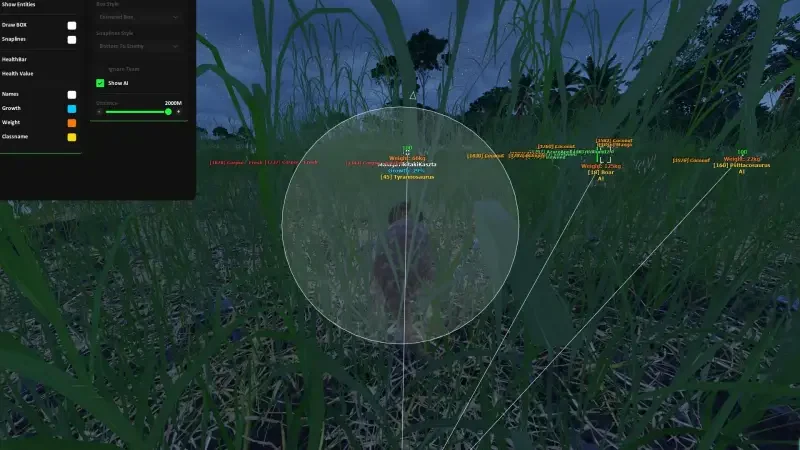
1 / 3
Monthly and lifetime unlock the same four modules. The Status label only tells you whether the current build is listed for load.
One menu, both prices
Player labels, AI labels, food and water markers, and misc ship together. There is no cheaper ESP-only key. Monthly is the first test on your PC. Lifetime is the one that stops the 31-day renewal.
Only what is listed
If a toggle is not named on the feature pages, it is not part of this menu. That includes aim assist, a radar, and vehicle markers.
Check Status first
GREEN means you can load. RED means wait. An Evrima patch can change the label even if your key is still valid.
Setup after you pay
Forum threads cover the first load. Support is for when those steps do not fix it.
The Status page is the current label. The purchase card shows the same label.
Open Status pageGREEN
Current build is listed under GREEN.
What the label is not
GREEN is not a promise the light stays GREEN after the next patch, and it says nothing about your account. The buyer's guide covers the risk of using cheats.
Open a group to see the switches. Player labels, AI labels, and food and water are listed separately so you can tell what a toggle actually marks.
All features comparedPlayer ESP plus player-facing visual toggles: box, snapline, name, distance, health, stamina, growth, species, direction, head dot, visible check, gore, and max distance.
NPC ESP and Animal ESP for Evrima, with growth, species, health, stamina, and distance labels under Visual Options.
Corpse, fruit, and water markers. These are the only world objects on the Visual list.
Custom crosshair overlay, suicide, fullbright, on-screen stats, custom keys, ESP colours, and a streamproof overlay for capture software.
Monthly and lifetime include all 35 published controls. Tap a name to jump to that control on the module page.
Player ESP, Box, Snapline, Name, Distance, Health, Stamina, Growth, Species, Player Direction, Head Dot, Visible Check, Gore, Max Distance
NPC ESP, Animal ESP, Health, Stamina, Growth, Species, Distance, Gore
Corpse, Fruit, Water
Crosshair, Suicide, Fullbright, Show FPS, Show Resolution, Show Time, Custom Menu Key, Custom Panic Key, Custom ESP Colors, Streamproof overlay
Match the line before you pay. Lifetime does not widen the list.
Published requirements
Listed as supported
Not on the requirements line
Same toggles on both plans. Monthly is how you find out if the loader opens on your PC. Lifetime is $150. Five months at $35 is $175.
Five months at $35 each is $175. Lifetime is $150 once.
Try monthly
$35
31 days of access. Good way to test the loader on your PC.
Best deal
Best deal
$150
One payment. Better value if you keep playing past a few months.
You pay here, then the delivery note hits the order email with the loader. The menu key is in that note. The fresh-install thread is the order to follow on a first load.
Fresh install threadOpen Status before you pay, and again before you load. GREEN means this build is listed for Evrima. RED means the last file is the wrong one. Wait.
Windows 10 or 11, Intel or AMD, The Isle: Evrima, security features on, and Cloud DMA available if you need full functionality.
Monthly is $35 for 31 days. Use it if you have not run the loader on this PC yet. Lifetime is $150 once. Five renewals are $175, so lifetime is cheaper if the grow is going to last.
Checkout is on this site, then the shop. The delivery note goes to the order email and includes loader access. Open the menu with the key in that note.
Evrima running, Status on GREEN, one load, then open the menu. The fresh-install thread is the order people use. If a clean retry still fails, support wants the order id.
What to send support
The troubleshooting guide covers delivery, loader, and menu problems in order. Support wants the checklist above.
Refunds and risk
A missing delivery or a long RED window during your license can qualify on the Refunds page. Bans and gameplay outcomes do not. The Terms of Use and the buyer's guide state the anti-cheat risk in plain words.
Feature pages, guides, and blog posts that go deeper than this checkout page.
The toggles, the PC line, and what to recheck when Evrima patches.
A Windows menu for The Isle on the Evrima branch. It draws labels. It does not aim for you. The groups are player ESP, NPC and animal ESP, corpse fruit and water markers, and a short misc list.
On players you can show a box, snapline, name, distance, health, stamina, growth, species, facing, a head dot, a visibility check, gore, and a max distance. AI uses NPC ESP and Animal ESP with health, stamina, growth, species, and distance. The map markers are corpse, fruit, and water. Misc adds a custom crosshair overlay (Evrima has no built-in reticle), suicide, fullbright, FPS, resolution, time, menu and panic keys, ESP colours, and a streamproof overlay for capture software.
Three switches: corpse, fruit, and water. Carnivores usually want corpses near a fight. Herbivores want fruit. Water matters on a long walk when thirst is the thing that ends the grow. They are not a loot scanner for crates or items.
No. The requirements line is Evrima only. The older legacy branch is not listed as supported.